> ## Documentation Index
> Fetch the complete documentation index at: https://docs.memorylake.ai/llms.txt
> Use this file to discover all available pages before exploring further.
# Invitations and Access
> Invite colleagues via email or link, and control joining, roles, and revocation
## Use Cases
* Bring colleagues into a shared workspace so team memory and quotas are collective.
* Resend or revoke invitations in a controlled way to avoid mistakes or stale links.
* Assign the right role at invitation time rather than fixing permissions afterwards.
All new members join through **invitation and acceptance** — there is no direct add-member action. Both sides need a **verified email address**: if yours isn't verified yet, the console prompts you to add and verify it before sending invitations, and invitees must have a verified address to accept.
## How to Invite
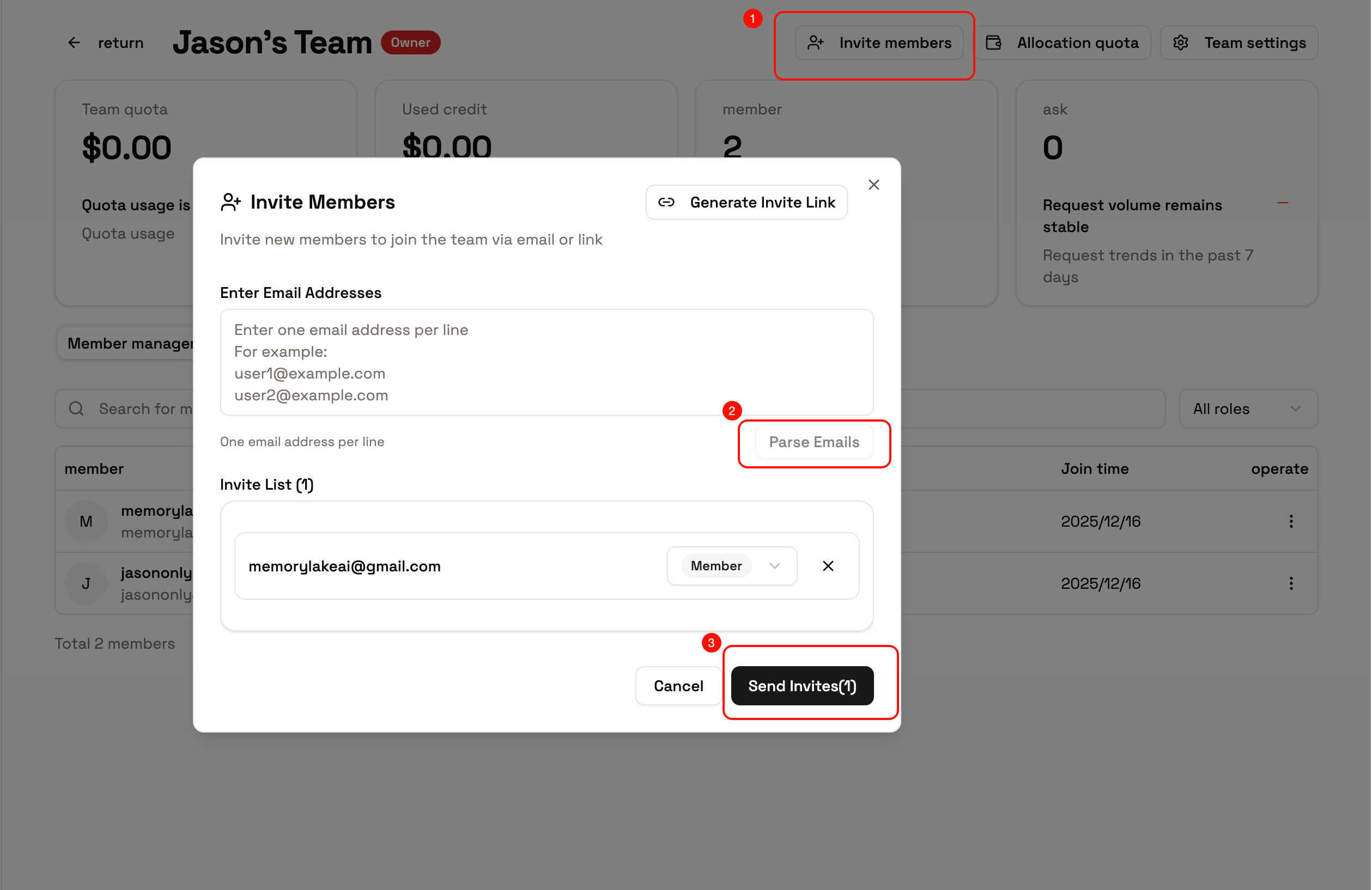
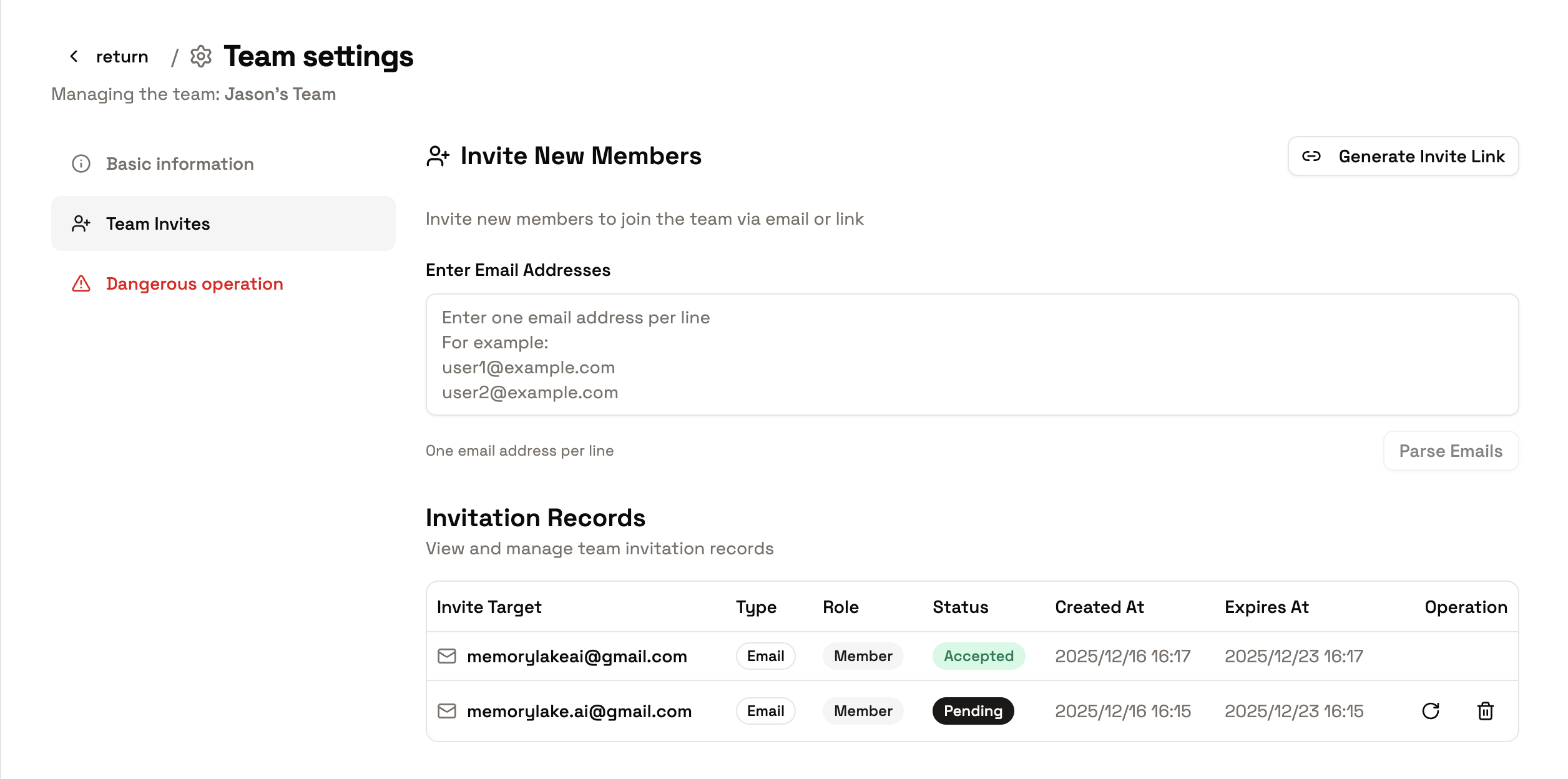
* **Email invitation**: enter one or more email addresses on the team's **Invites** tab. You can paste a batch — one address per line — and specify a role per line. Invitations can be resent or revoked while pending.
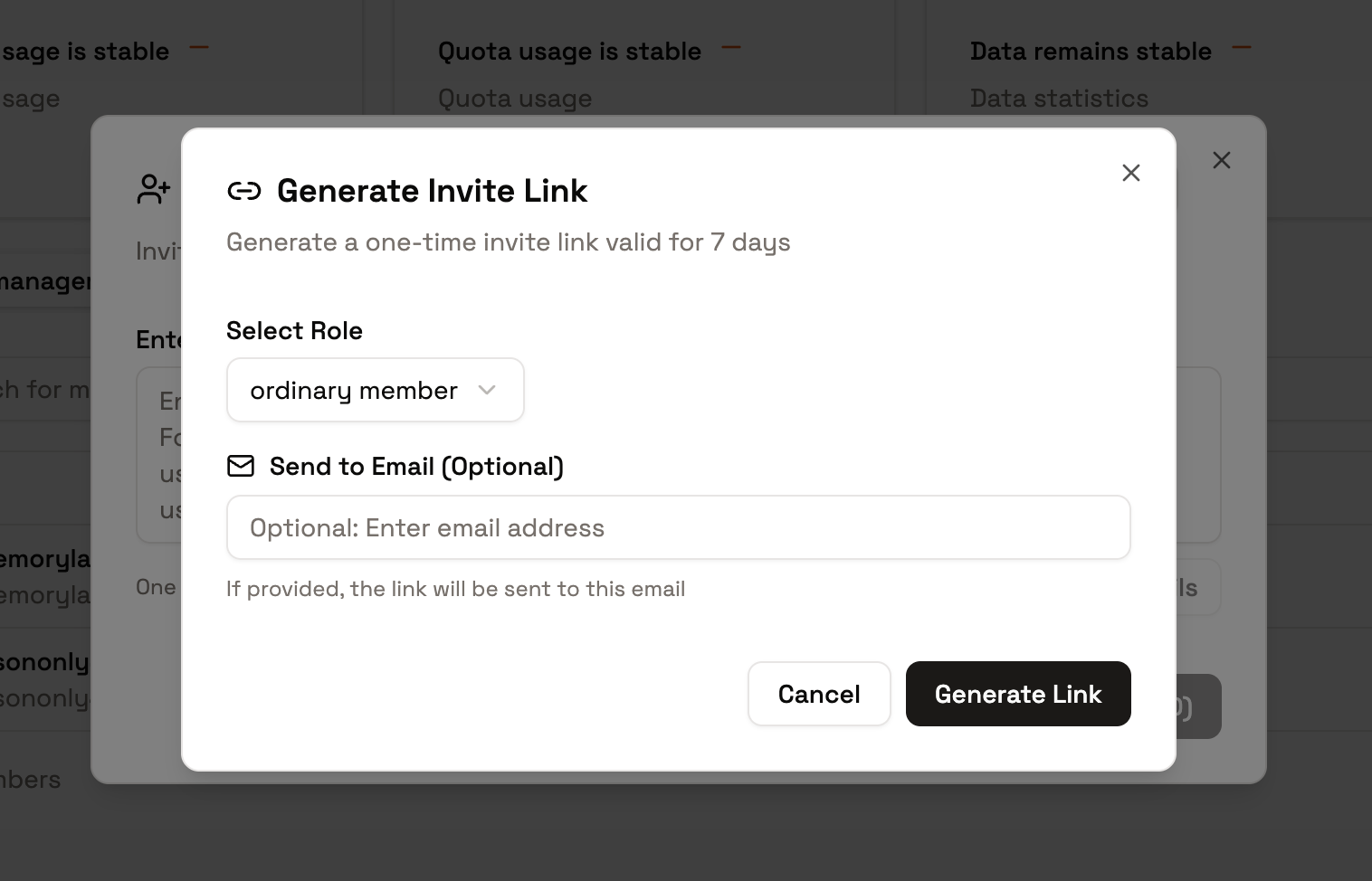
* **Invitation link**: generate a shareable link. Anyone opening it can accept after signing in (or after completing registration). Revoke the link to invalidate it.
* **Invitee experience**: accepting after sign-in adds them to the team with the role you assigned. If they open an invite while logged out, they're returned to it automatically after signing in or registering.
 ## Joining and Access Control
* **Before acceptance**: pending invitations can be revoked at any time. Wrong address? Revoke and resend — email matching is case- and whitespace-insensitive, so duplicates are caught.
* **After acceptance**: adjust roles and quotas from the **Members** tab, grant per-resource scopes, or remove members. Members can also leave voluntarily.
* **Workspace access**: new members are added to the team's workspaces automatically, so shared memory is immediately available (deployment-configurable).
* **Context and permissions**: once in the team, calls made in the team context draw on team quota and follow the member's role permissions.
## Joining and Access Control
* **Before acceptance**: pending invitations can be revoked at any time. Wrong address? Revoke and resend — email matching is case- and whitespace-insensitive, so duplicates are caught.
* **After acceptance**: adjust roles and quotas from the **Members** tab, grant per-resource scopes, or remove members. Members can also leave voluntarily.
* **Workspace access**: new members are added to the team's workspaces automatically, so shared memory is immediately available (deployment-configurable).
* **Context and permissions**: once in the team, calls made in the team context draw on team quota and follow the member's role permissions.
 ## Quick Start
1. Open team details → **Invites**, and send an email invitation (or generate a link).
2. Assign each invitee's role as you invite — Owner, Admin, Member, or a custom role.
3. Revoke or resend anything still pending as needed.
4. After they join, fine-tune quotas and per-resource scopes on the **Members** tab.
## Tips
* Revoked invitations and links are permanently invalid — generate a new one to continue.
* For sensitive teams, prefer email invitations (identity is verified) and revoke links after short-term use.
* Confirm your current space before making calls, so you don't consume personal quota in a team context or vice versa.
## Next Steps
* [Roles and Permissions](/features/team-collaboration/roles-permissions) — what each role can do, plus custom roles and resource scopes
* [Quotas and Usage](/features/team-collaboration/quota-and-usage) — allocate and monitor consumption
## Quick Start
1. Open team details → **Invites**, and send an email invitation (or generate a link).
2. Assign each invitee's role as you invite — Owner, Admin, Member, or a custom role.
3. Revoke or resend anything still pending as needed.
4. After they join, fine-tune quotas and per-resource scopes on the **Members** tab.
## Tips
* Revoked invitations and links are permanently invalid — generate a new one to continue.
* For sensitive teams, prefer email invitations (identity is verified) and revoke links after short-term use.
* Confirm your current space before making calls, so you don't consume personal quota in a team context or vice versa.
## Next Steps
* [Roles and Permissions](/features/team-collaboration/roles-permissions) — what each role can do, plus custom roles and resource scopes
* [Quotas and Usage](/features/team-collaboration/quota-and-usage) — allocate and monitor consumption